 I have been a fan of using datatables for a while and always wanted to generalize the server side example to be able to use SQLite, MySQL or any other PDO supported database.
For the longest time in my projects I have used PHP AdoDB as my Database abstraction layer, mostly because it came with a basic paging grid display which I had customized and used in many many projects. But time’s have changed and modern (“ajaxy”)tabular grids like datatables offer a lot more in terms of functionality .
I have a newer related article here on using Bootgrid (Data grid) with PHP ajax server via PDO.
Why DataTables?
Datatables is one of the most useful Jquery plugins because it provides very rich functionality when it comes to displaying tabular data. In its most simplest form, it’s just a few lines of code and it can transform any on-page table into searchable ,filterable table with ton’s of formatting and interaction actions. While being able to manipulate single-page HTML tables is useful for small data-sets,server-side processing is one of its best features.
power of Server Side…
The real power of datatables for large data sets is when you bundle it with a server-side code.Datatables has an example here using PHP and MySQL. The only issue is the example is fairly specific to MySQL and pretty hard-coded to a particular table structure, so my goal was to re-write it using PDO as the base database abstraction and altering the MySQL specific code to be more generic and work with SQLite (As well as MySQL). Below is my explanation of how i did this.
My class serverdatapdo…
My goals were:
- Take existing server side code and generalize it to work with PDO (PHP database abstraction)
- Alter MySql specific SQL so it works with most SQL flavors
- Make it into a SINGLE class /file (not essential but I just like dealing with one file)
- Add some simple logic for it to parse SQL strings into column names, I stress simple logic, I didn’t write a SQL parser.
- Provide timing data for returned query results.
So I bit the bullet and created a a single class (I love simple, single files) , which handles both the client-side rendering and the server-side processing that works with the PDO library and allows you to use just a few lines and generate a complete server-side example.
Usage Steps.
– Using PHP, The example page below makes use of two static classes (meaning you don’t need to instantiate them, just call them like a function) and place this code where the JQUERY (Javascript) would normally go. First fill out $db_Array with SQL (which will be passed to server-side), default table and default index
Client Side:
/* Spell out columns names do not use * as in SELECT * FROM Table */
$db_array=array(
“sql”=>’SELECT movie,year,rating_imdb,genre FROM films‘,
“table”=>’films‘, /* FROM TABLE to use assigned by constructor*/
“idxcol”=>’id’ /* Indexed column (used for fast and accurate table cardinality) */
);
$javascript = ServerDataPDO::build_jquery_datatable($db_array); generates the Jquery Javascript call to the server side. It also builds the SQL string to pass over in a base64encode to the server side. Further on down the page..
$cols=” movie,year,rating_imdb,genre “; //Column names for datatable headings (typically same as sql)
$html =ServerDataPDO::build_html_datatable($cols); This class generates the HTML5 table structure used by Datatables to fill in from the server-side response. You specify column names here that will become your column headings.
<!DOCTYPE html>
<html >
<head>
<title>Sample HTML5 Datatables with PDO SQLite MySQL </title>
<link rel="stylesheet" type="text/css" href="css/jquery.dataTables.css" />
<link rel="stylesheet" type="text/css" href="css/style.css" />
<script type="text/javascript" language="javascript" src="js/jquery.js"></script>
<script type="text/javascript" language="javascript" src="js/jquery.dataTables.min.js"></script>
<?php
include "serverdatapdo.php"; // this class handles is both server and client side data

//now generate the datatables Jquery with this SQL here:
//for added security move this array into to the serverside client
$db_array=array(
/* Spell out columns names no SELECT * Table */
"sql"=>'SELECT movie,year,rating_imdb,genre FROM films',
"table"=>'films', /* DB table to use assigned by constructor*/
"idxcol"=>'id' /* Indexed column (used for fast and accurate table cardinality) */
);
//Custom datatables properties added to Jquery build datatable

$javascript = ServerDataPDO::build_jquery_datatable($db_array);
echo $javascript;
?>
</head>
<body>
<h2>Sample Datatables with SQLITE Movies & TV Database| MySQL via PDO</h2>
<hr>
<?php
//now generate the HTML databable structure from SQL here:
$cols=" movie,year,rating_imdb,genre "; //Column names for datatable headings (typically same as sql)
$html =ServerDataPDO::build_html_datatable($cols);
echo $html;
?>
</body>
</html>
Server Side:
– using server side just make sure that the serverdatapdo.php is accessible.
/* Change these to correspond to your database type (dsn) and access credentials, example below uses sqlite w/o pass */
$db_dsn="sqlite:movies.db"; /* corresponds to PDO DSN strings refer to: http://www.php.net/manual/en/pdo.drivers.php */
$db_user=null;
$db_pass=null;

/* Sample MySQL Example -modify as needed
$db_dsn= 'mysql:host=localhost;dbname=testdb';
$db_user = 'username';
$db_pass = 'password';
*/

//When called directly via the Jquery Ajax Source look for this
//SECURITY NOTE: Consider moving this if..block to another file if security is a concern.
if ( isset($_GET['oDb']) ) //is this being called from datatables ajax?
{

//Do we have an object database info (Serialized) if so expand it\\
//echo $_GET['oDb'];
$d=unserialize(base64_decode($_GET['oDb'])); //get the SQL array object NOTE HARDEN this by encrypting
$pdo = new ServerDataPDO($db_dsn,$db_user,$db_pass,$d['sql'],$d['table'],$d['idxcol']);
$result=$pdo->query_datatables(); //now return the JSON Requested data */
echo $result;
exit;
}
couple of performance improvement tips…
There’s a few additional items not in this example that you can take advantage of to improve performance.
- Limit which columns SQL will use in the WHERE clause: By default the sever-side search algorithm will attempt to make all the columns in the SELECT col1, col2,col3 etc.. search able, and expand the SQL to something like this…
SELECT SELECT col1, col2,col3 FROM Table1 WHERE
( col1 LIKE'%search_term'%' OR
col2 LIKE'%search_term'%' OR
col3 LIKE'%search_term'%' )
Needless to say this is not the most efficient search . So to LIMIT the WHERE clause to a few columns in Datatables Jquery simply use “aoColumns“[ { “bSearchable“: false … making false each column that you do not want in the LiKE
// Using aoColumns
$(document).ready( function() {
$('#example').dataTable( {
"aoColumns": [
{ "bSearchable": false },
null,
null,
null,
null
] } );
} );
This will only add the columns with the bSearchable:true to the WHERE clause.
Also don’t forget to add a database index to the frequently queried columns, and use EXPLAIN SQL to identify query bottlenecks - Another performance tip (which is included) in this script is to add a key-delay or only issue ajax search requests when certain number of columns are reached. By default the server side search initiates a search request per keystroke entered in the search field, to avoid this refer to the fnSetFilteringDelay datatables plugin which checks for a delay of xxx ms between keystrokes before initiating the ajax request. Here’s the code: (Source: Datatables forums )
Demo
-
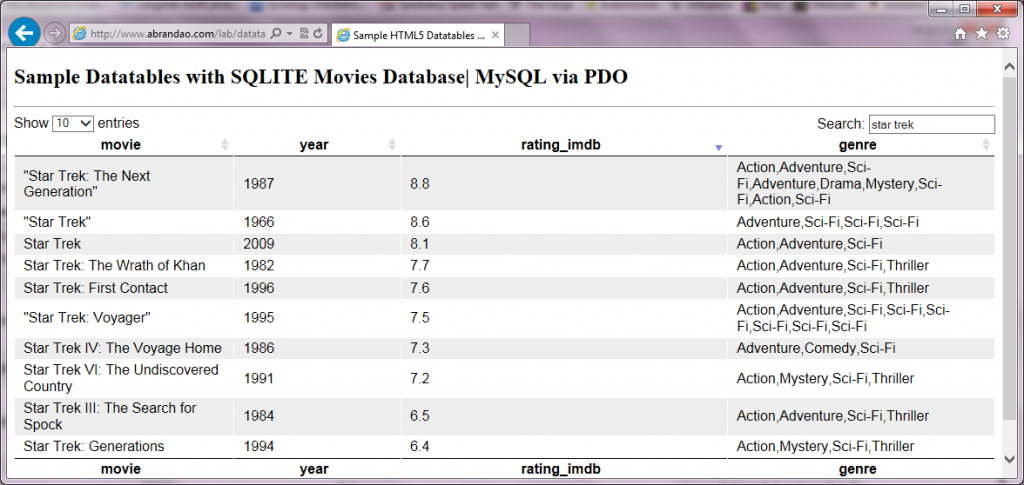
Demo SQLite Datatables Movies DB
Click on this link to see is running on a Demo: Sample server-side database of movies in SQLite..
Download Demo Files:
- If there’s interest I can put this up gitHub , but for now here’s the download link.
- Grab your copy of Datatables from the source.
- ZIP Source Code for exampel above (HTML, CSS, and PHP)
- Sample SQLite Database (movies.db 423Kb)
Please feel free to share comments or feedback on this.
Found this helpful? consider a tip for a tip… 