I recently came across Jquery Bootgrid, which is Twitter Bootstrap (aka bootstrap) friendly table grid, that is very similar in function to Datatables.While not as feature rich as datatables (yet), it provides a very tiny 4Kb (minified and gzipped) footprint and allows you to leverage all the typography and layout control elements that are present in bootstrap. Because of this, its almost instantly pleasing to the eye with its neatly formatted cell spacing and padding, polished typography and a whole bunch of methods and configuration settings that allow you to display and manipulate tabular data in a modern format.
The basic functionality out of the box, it that it converts any HTML5 table with properly marked up <tbody> <thead> etc. tags into a sortable, searchable data grid. While this is pretty useful, making static HTML (in page) tables come alive, it has attributes in it that allow the table data source to be rendered from an ajax call using a JSON formatted stream , all this makes the HTML markup even cleaner.
The purpose of this post is to provide one PHP implementation of that server side JSON script to allow you to use it with boot grid.
Source code available on GitHub: https://github.com/acbrandao/PHP/tree/master/bootgrid
What is Twitter Bootstrap (aka Bootstrap) & Bootgrid
Twitter bootstrap is a very popular front-end css framework, that combines modern HTML5 , CSS 3 and other elements of front-end web design to help create consistent responsive web pages. Using this framework one can quickly create consistently formatted pages, that use a wide variety of marked up css classes to provide a responsive design.
While plain vanilla Bootstrap provides basic table formatting, it does not offer more rich data grid or database table functionality . That is where Bootgrid comes in. It builds on the design language of the bootstrap table but adds, many more features, when working with tabular data. If you have seen or used Datatables, there may be some similarity, but bootgrid’s focus is on a lean Bootstrap plugin rather than a stand-alone feature-rich jQuery component.
Client Site Code
First setup the web page that will use Jquery , Bootstrap and Bootgrid to provide the HTML view of the server side data. First lets include all the HTML5 , CSS and Javascript dependencies, to do this you can point to the BootStrap CDN as shown here, or copy all the required .js and .css files locally to your web server.
Client side dependencies
- Jquery js/jquery-1.11.1.min.js
- Jquery Boot grid jquery.bootgrid.min.js
- Twitter Bootstrap bootstrap.min.css
You can download all these and then setup up them in your own environment, or simply link them in from a corresponding CDN, check CDNJS.COM for a master list of popular javascript and css library files with CDN links..
Client side code
The web page code below is pretty straight forward, after you setup (include) all the dependant files, then you simply need to spell out the table. This example uses a simple movies database table as its structure. Using the proper class attributes for bootstrap and a unique id=grid-data name for the table, plus the column headings that you want to display, you can have a dynamically generated table appear.
Notice the data-ajax and data-url attributes inside the table tag these tell boot-grid that the data source is coming from outside the page. For a more complete description of bootgrid’s methods, check out its own documentation.
<!--define the table using the proper table tags, leaving the tbody tag empty -->
<table id="grid-data" class="table table-condensed table-hover table-striped"
data-toggle="bootgrid" data-ajax="true" data-url="server.php">
<thead>
<tr>
<th data-column-id="id" data-type="numeric" data-identifier="true">id</th>
<th data-column-id="movie">Movie</th>
<th data-column-id="year" data-type="numeric">year</th>
<th data-column-id="genre">Genre</th>
<th data-column-id="rating_imdb" data-type="numeric">Rating</th>
</tr>
</thead>
</table>
Once this is defined, then somewhere on your page, be sure to instantiate the grid with the command below.
<!DOCTYPE html>
<html lang="en">
<head>
<meta charset="utf-8">
<meta http-equiv="X-UA-Compatible" content="IE=edge">
<meta name="viewport" content="width=device-width, initial-scale=1">
<title>Bootgrid Sample Template</title>
<!-- Bootstrap CSS-->
<link href="css/bootstrap.min.css" rel="stylesheet">
<link href="js/jquery.bootgrid.css" rel="stylesheet">
</head>
<body>
<h2> My Bootgrid Implementation </h2>
for more info about <A href="http://www.jquery-bootgrid.com/">bootgrid</a>

<!--define the table using the proper table tags, leaving the tbody tag empty -->
<table id="grid-data" class="table table-condensed table-hover table-striped"
data-toggle="bootgrid" data-ajax="true" data-url="server.php">
<thead>
<tr>
<th data-column-id="id" data-type="numeric" data-identifier="true">id</th>
<th data-column-id="movie">Movie</th>
<th data-column-id="year" data-type="numeric">year</th>
<th data-column-id="genre">Genre</th>
<th data-column-id="rating_imdb" data-type="numeric">Rating</th>
</tr>
</thead>
</table>

<!-- jQuery (necessary for Bootstrap's JavaScript plugins and Bootgrid) -->
<script src="js/jquery-1.11.1.min.js"></script>
<!-- Include all compiled plugins (below), or include individual files as needed -->
<script src="js/bootstrap.min.js"></script>
<!-- Include bootgrid plugin (below), -->
<script src="js/jquery.bootgrid.min.js"></script>

<!-- now write the script specific for this grid -->
<script language="javascript">
//Refer to http://jquery-bootgrid.com/Documentation for methods, events and settings

//load gird on page\e load...
$("#grid-data").bootgrid(
{
caseSensitive:false /* make search case insensitive */

});
</script>

</body>
</html>
PHP server side ajax json
Much like I described in my Datatables server side post. I again turn to PHP to provide the server side database read layer and to allow me to read from a database (SQLite in this example) and then render that data out as JSON ,in a format friendly to bootgrid. The database I will be using will be a simple one-table movies database stored in a SQLite 3 formatted file .
Unlike my datatables PHP example, I did not try to make the server script generic, this time I kept the server side simpler, opting for a simple procedural script that can be easily extended. Here’s the outline of the steps.
- uses PHP PDO as the database layer to connect to the database
- setups various QueryString checks to see if the incoming request has them, this is what Bootgrid issues when it creates an Ajax request for paging information, sorting, etc.
- Substitute the search Phrase into the SQL command
- Execute the query and return the results as a JSON string
- finally add some extra metadata about number of records and paging information to help Bootgrid display the grid properly
Important Note: This is just for a proof of concept script and I strongly encourage if you’re going to use this as a basis of a production system, you tighten up the security especially of the SQL component. With that said here’s the PHP script.
<?php

try {
// $DBH = new PDO("mysql:host=$host;dbname=$dbname", $user, $pass); //MYSQL database
$conn = new PDO("sqlite:db/movies.db"); // SQLite Database
$conn->setAttribute(PDO::ATTR_ERRMODE, PDO::ERRMODE_EXCEPTION);

$where =" 1=1 ";
$order_by="rating_imdb";
$rows=25;
$current=1;
$limit_l=($current * $rows) - ($rows);
$limit_h=$limit_lower + $rows ;

//Handles Sort querystring sent from Bootgrid
if (isset($_REQUEST['sort']) && is_array($_REQUEST['sort']) )
{
$order_by="";
foreach($_REQUEST['sort'] as $key=> $value)
$order_by.=" $key $value";
}

//Handles search querystring sent from Bootgrid
if (isset($_REQUEST['searchPhrase']) )
{
$search=trim($_REQUEST['searchPhrase']);
$where.= " AND ( movie LIKE '".$search."%' OR year LIKE '".$search."%' OR genre LIKE '".$search."%' ) ";
}

//Handles determines where in the paging count this result set falls in
if (isset($_REQUEST['rowCount']) )
$rows=$_REQUEST['rowCount'];

//calculate the low and high limits for the SQL LIMIT x,y clause
if (isset($_REQUEST['current']) )
{
$current=$_REQUEST['current'];
$limit_l=($current * $rows) - ($rows);
$limit_h=$rows ;
}

if ($rows==-1)
$limit=""; //no limit
else
$limit=" LIMIT $limit_l,$limit_h ";

//NOTE: No security here please beef this up using a prepared statement - as is this is prone to SQL injection.
$sql="SELECT id, replace(movie,'\"','' ) as movie, year, rating_imdb,genre FROM films WHERE $where ORDER BY $order_by $limit";

$stmt=$conn->prepare($sql);
$stmt->execute();
$results_array=$stmt->fetchAll(PDO::FETCH_ASSOC);

$json=json_encode( $results_array );</pre>
<pre> /* specific search then how many match */
$nRows=$conn->query("SELECT count(*) FROM films WHERE $where")->fetchColumn();

header('Content-Type: application/json'); //tell the broswer JSON is coming

if (isset($_REQUEST['rowCount']) ) //Means we're using bootgrid library
echo "{ \"current\": $current, \"rowCount\":$rows, \"rows\": ".$json.", \"total\": $nRows }";
else
echo $json; //Just plain vanillat JSON output
exit;
}
catch(PDOException $e) {
echo 'SQL PDO ERROR: ' . $e->getMessage();
}
?>
Some considerations..
One immediate consideration is related to the search performance of the server script, because every keystroke initiates a server search (ajax request) this could quickly overwhelm a server on a busy site, or one with a large database. Also the server side (in this case) searches across multiple columns (in this example) , it will impact your performance substantially if this table is of any real size. Since our example table only has around ~3300 records, its hard to simulate performance issues, which may not be apparent.
A better approach is to only begin issuing ajax requests after n-characters (string length) are typed into the search box. Also limit the search on the server to the most relevant fields and avoid using LIKE %search_term% whenever possible , finally and be sure to have those columns indexed properly.
Also a very nice feature of Bootgrid is that it maintains state and handles SORTING internally for AJAX completed requests. This is very nice if you have large results sets as sorting can be done intelligently (it may need to fetch from the server), but it makes for snappy performance.. Try this search for same “drama” then click on one of the columns to sort.. notice how quick and efficient.
Demo
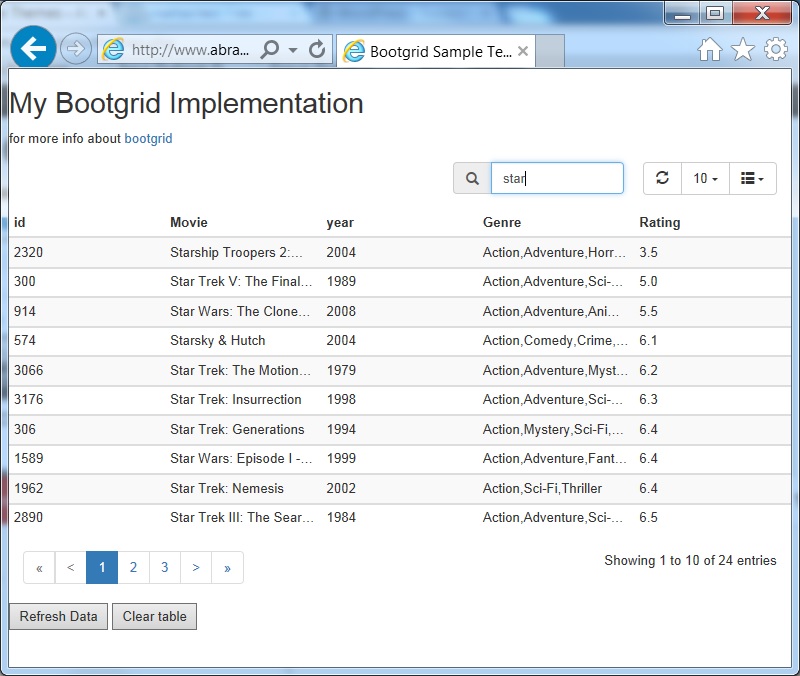 Here’s a link to a short demo of the bootgrid PHP server system.. and you can compare this against my datatables demo.
For comparison purposes take a look at my earlier PHP PDO datatables sample
Download
You can download all the core files here, but I recommend you, update the links to the dependant files(Bootstrap, Bootgrid and Jquery ) to ensure you’re getting the latest stable packages.
- Download complete code, php and database file (Sqlite) of Bootgrid PHP server (bootgrid.zip 365Kb)
- If you find this useful, share your love by donating a beer (via PayPal link) to the author of Bootgrid and for that matter to the other contributors to the Jquery and Bootstrap eco-system. I encourage you to share this link.
- Source code also available on GitHub: https://github.com/acbrandao/PHP/tree/master/bootgrid